-2-(3).png)
Editing a Product After Connecting It to NINEMAGS
Once a product is connected to NINEMAGS, it’s important to understand which changes are safe and which ones can cause issues with image uploads or order processing.
Safe Product Changes ✅
These changes do not break the NINEMAGS integration and can be made at any time.
Content & Visuals
- Product title
- Product description
- Main product images (Media)
- Order of blocks on the product page
- Colors and styles of the NINEMAGS button
- Text content on the product page
Pricing & Marketing
- Product price
- Discounts
- Compare at price
- SEO settings (title, description)
- Collections and tags
Inventory & Shipping
- Quantity (Available)
- SKU
- Weight and shipping settings
- Sell when out of stock
📌 These changes do not affect how the image uploader works.
Unsafe Changes ⚠️ (and Why)
These actions may cause:
- the upload button to disappear
- images not to upload
- orders to stop processing correctly
❌ Deleting or Renaming Variants
Unsafe actions:
- Deleting variants that are already connected to NINEMAGS
- Renaming variant values (for example:
2x2→2 x 2 inch)
Why this is risky:
- NINEMAGS is linked to specific variants
- Changing a variant can break this connection
- Uploaded images may no longer match the correct variant
✅ How to fix:
- First, update the variant in Shopify
-
Configure or update the variant in Apps → NINEMAGS → Products → find your listing, and click Configure
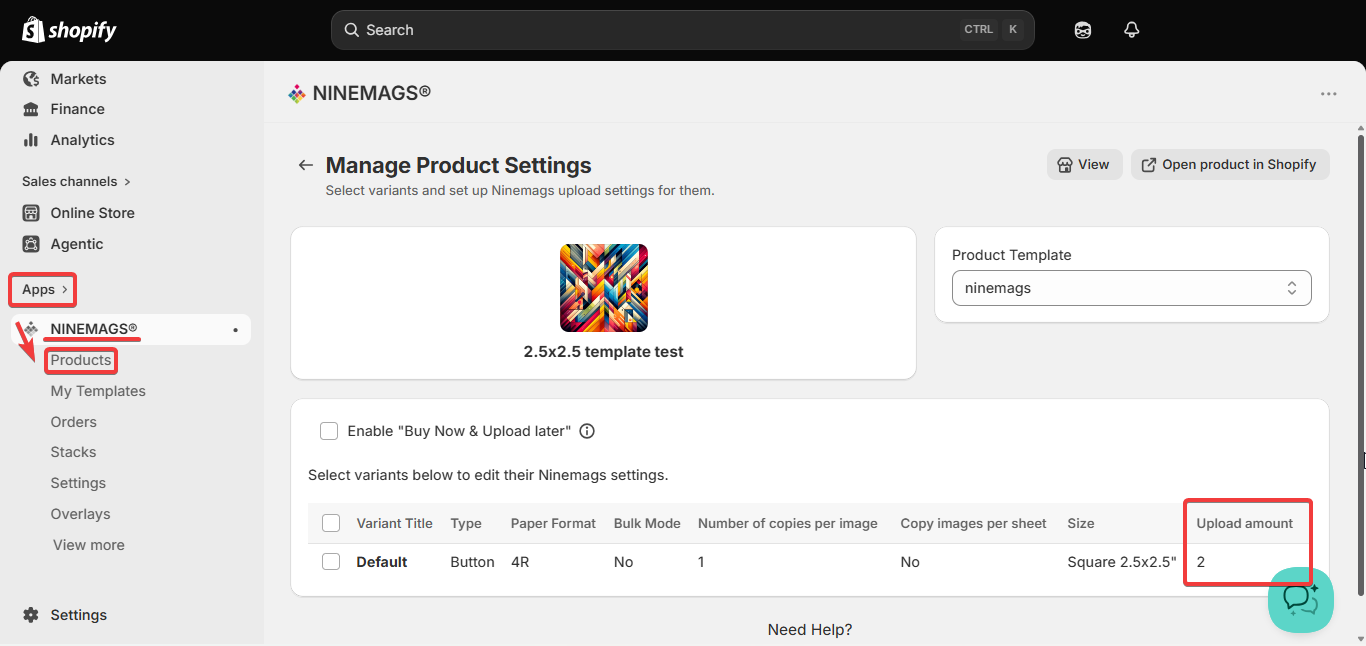
- Check the Upload amount
- Always test the product on the storefront
❌ Changing the Variant Structure
Unsafe actions:
- Changing the option name (for example:
NINEMAGS Magnets) - Merging or splitting variants after connection
- Adding new variants without configuring them in NINEMAGS
Why this is risky:
- New variants won’t know how many images to accept
- The upload button may behave incorrectly
✅ How to fix:
- First, update the variant in Shopify
-
Configure or update the variant in Apps → NINEMAGS → Products → find your listing, and click Configure
- Check the Upload amount
- Always test the product on the storefront
❌ Removing the Product Template
Unsafe action:
- Changing or deleting the
ninemags_template
Why this is risky:
- The template controls how the uploader works
- Without it, the upload button may disappear from the storefront
✅ How to fix:
If a product template has already been deleted, please follow this guide to create a new one:
https://help.ninemags.com/article/28-creating-and-setting-up-a-ninemags-template
❌ Removing the NINEMAGS Button Block
Unsafe action:
- Removing the NINEMAGS button block from the product template
Why this is risky:
- Customers won’t be able to upload images
- Orders cannot be completed correctly
✅ What to do if you do not need an upload button:
-
Either switch your products template to default in Apps → NINEMAGS → Products to make it purchasable like any other non-custom product:
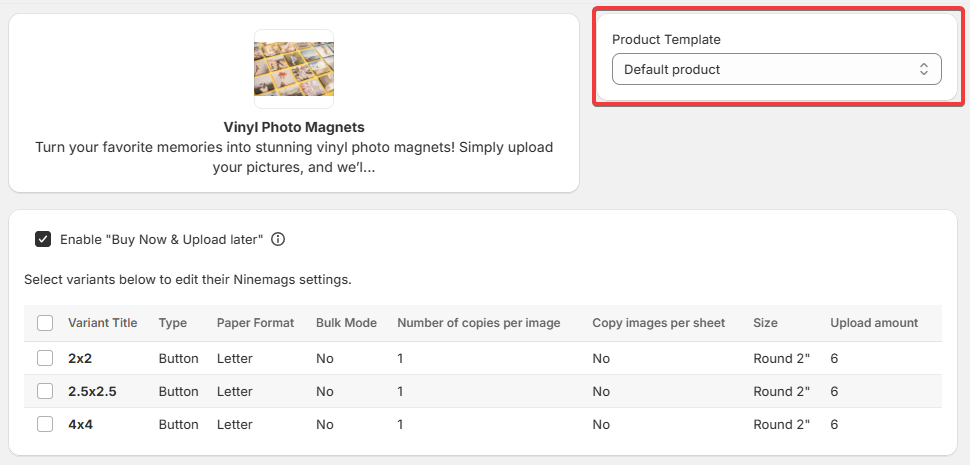
Or
-
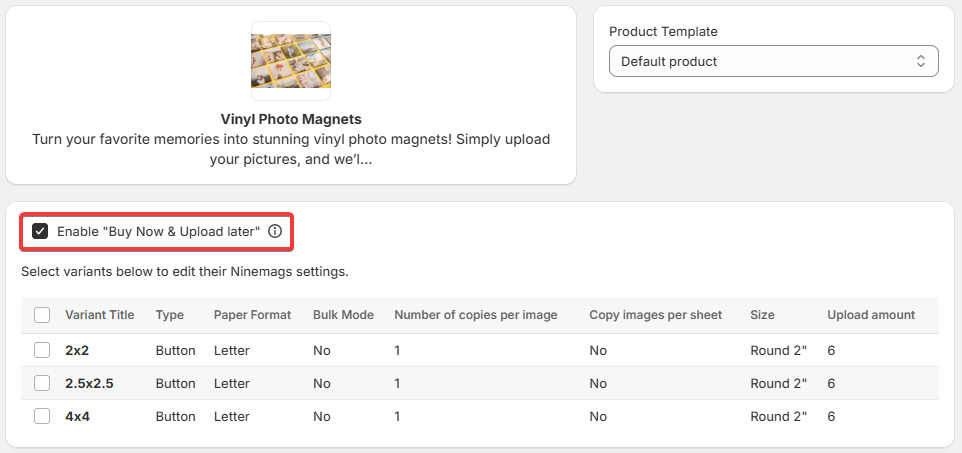
Enable Buy now, Upload later feature- with this enabled, your customers will receive a link to an uploader after making and paying for their order:
Quick Summary
✅ Safe to change:
- text
- images
- price
- design
⚠️ Never change without checking:
- variants
- variant names
- product template
- NINEMAGS connection