-2-(3).png)
Black Borders
What are Black Borders
Black Borders are black margins that are automatically added around an image when print files are generated.
In the final print file, the uploaded image is centered, and any missing area is filled with a black background.

How Black Borders work
- The customer uploads an image
- NINEMAGS generates a print file for the required size
- Instead of white margins, black borders are added around the image
Important:
Black Borders affect print files only. They do not affect the customer preview.
How to enable Black Borders
-
Open the NINEMAGS app
Shopify Admin → Apps → NINEMAGS
- Go to Settings
- Find the Printing section
-
In the Text block, enable the option:
☑ Use white text on black background
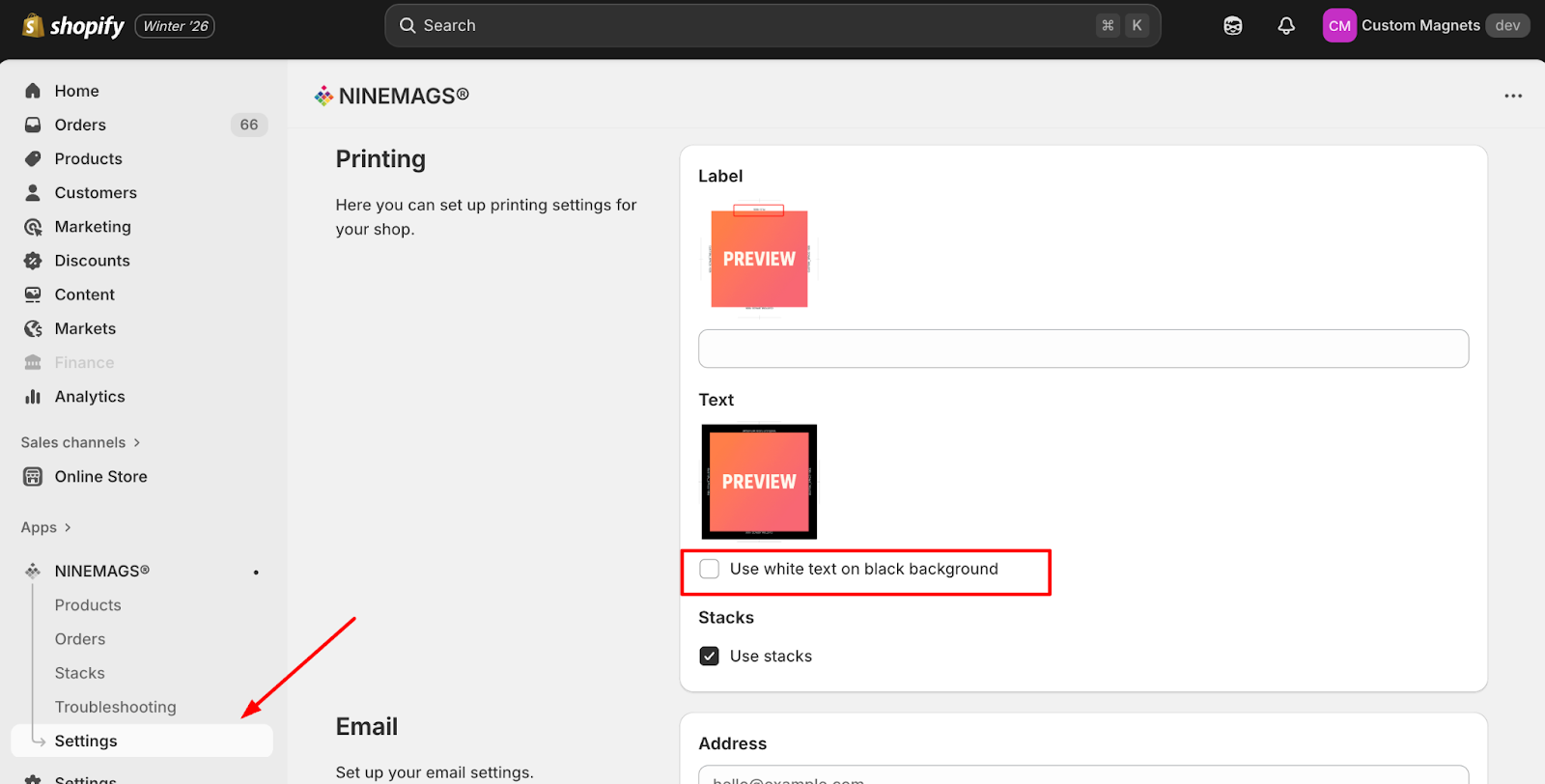
- Click Save in the top-right corner
Where Black Borders are visible
Black Borders are visible only in the final print files that:
- are automatically generated by NINEMAGS
- are saved and sent to Dropbox (print files)

Where Black Borders are NOT visible
In the storefront (for customers):
- Product preview does not change
- Black borders are not shown
In Shopify (product page or cart):
- Black Borders are not visible
Important to remember
Black Borders:
- do not change the customer’s uploaded image
- are not visible on the storefront
- affect only final print files